BYOK AI Project Management: Bring Your Own Claude API Key
Most AI project tools meter every generation and charge you a markup on top of the model. BYOK lets you route through your own Claude, OpenAI, or Gemini key — your bill, your model, no cut.
on this page4 sections
Credits are an interest rate on your ideas. Every time you generate a plan, extract tasks from a transcript, or draft a status update, the meter ticks. For light use that's fine. For a team that lives in the tool — or runs agentic workflows that loop through many model calls — the markup compounds.
BYOK removes the middle layer. You already have an API key with Anthropic, OpenAI, or Google. You point the tool at it. The provider bills you directly at their rate, and the project tool takes nothing on top.
note:
The short version: BYOK = you pay the model provider directly instead of paying a project tool a marked-up credit for the same call. Same model, lower cost, more control over which model runs.
What BYOK actually means
BYOK stands for "bring your own key" — an API key from a model provider that you supply to a third-party app so it runs AI on your account instead of theirs. The app becomes the interface; the model spend is yours. Three things follow from that: you pay the provider's real rate, you choose the exact model, and your usage isn't capped by someone else's credit bucket.
BYOK vs managed credits
| Feature | Managed credits | BYOK |
|---|---|---|
| Who you pay | The project tool (marked up) | The model provider (direct) |
| Model choice | Whatever the tool picks | You pick the exact model |
| Usage limit | Credit bucket | Your provider quota |
| Best for | Light or occasional use | Heavy use, teams, agentic loops |
| Setup | None | Paste one API key |
Cost is the obvious win. Control is the quieter one. With BYOK you decide which model runs each generation — the latest Claude for fidelity, a fast model for speed — instead of inheriting the tool's default. And your AI calls go out under your own provider account, governed by the data terms you already agreed to with that provider.
That matters for teams with procurement or privacy requirements. The model relationship is yours, the billing is yours, and the project tool is just the workflow on top.
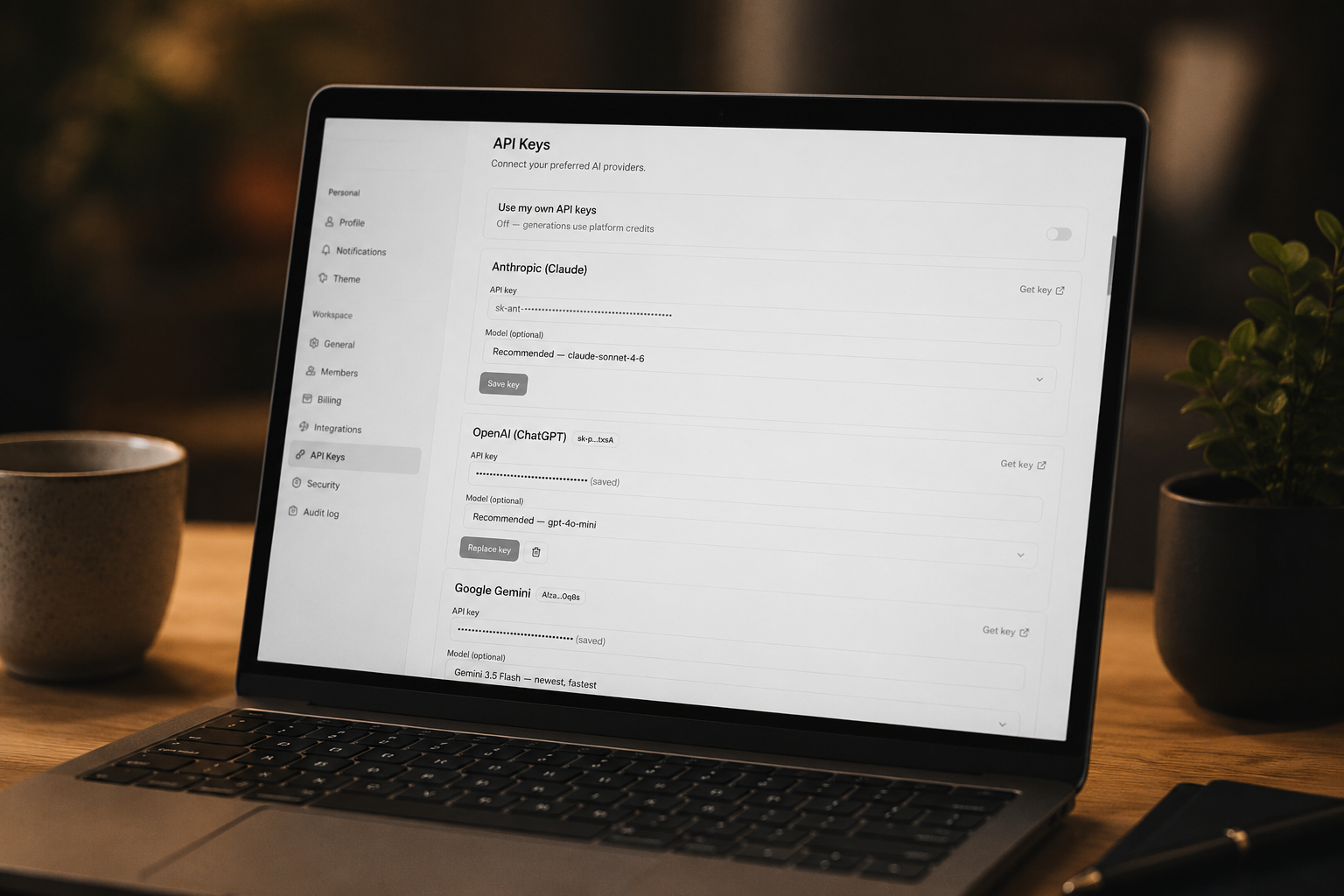
How sprintrr does BYOK
BYOK is available on every sprintrr plan — not gated behind an enterprise tier. You add a key in Settings under API Keys, pick the provider and model, and that's it. A few details we built in on purpose:
- Keys are encrypted at rest with AES-256-GCM. Only a first-four / last-four hint is stored for display — never the raw key in plaintext.
- Keys are validated before they're saved. We run a live test call so a bad key fails at setup, not mid-generation.
- BYOK generations bypass credit consumption entirely. When your key is active, the credit meter doesn't move — you're paying your provider, so we don't double-charge.
- You choose the source per generation. Switch between sprintrr credits and your own key call by call, with honest attribution of which model ran in the activity feed.
— The sprintrr teamIf you already pay Anthropic, OpenAI, or Gemini directly, you should be able to route Sprintrr through that bill — and we shouldn't take a cut.
Who should turn it on
Reach for BYOK if any of these are true: you generate often enough that credits feel like a tax, you want a specific model the tool doesn't default to, you have privacy or procurement rules about where AI calls run, or you're leaning into agentic workflows that multiply model calls. If you only generate occasionally, managed credits are simpler — start there and switch when the meter starts to sting.
aside:
You don't have to choose once and forever. sprintrr lets you flip between your own key and credits per generation, so you can keep credits as a fallback and run BYOK for the heavy work.
What does BYOK mean?
BYOK stands for "bring your own key" — you supply your own API key from a model provider (Anthropic, OpenAI, Google) so the app runs AI on your account and bills, instead of charging you marked-up credits for the same call.
Is BYOK cheaper than credits?
For frequent or team use, almost always — you pay the provider's direct rate with no markup. For light, occasional use, managed credits can be simpler and the cost difference is small. The heavier the usage, the more BYOK saves.
Which providers can I use with sprintrr BYOK?
Anthropic (Claude), OpenAI, and Google Gemini. You pick the provider and a specific model when you add the key in Settings.
Is my API key stored securely?
Yes. sprintrr encrypts keys at rest with AES-256-GCM and stores only a first-four / last-four hint for display — never the raw key in plaintext. Keys are validated with a live test call before they're saved.
Does BYOK use my sprintrr credits?
No. When your own key is the active source, generations bypass the credit meter entirely — you're already paying your provider, so sprintrr doesn't double-charge.
Do I need a paid plan to use BYOK?
No. BYOK is available on every sprintrr plan, not locked behind an enterprise tier.
Run AI project management on your own key.
BYOK is on every sprintrr plan. Paste your Claude, OpenAI, or Gemini key and generate plans at provider cost — no markup.
// more from the journal